
It’s roadmap time! As we recently mentioned, the beginning of the year is a great time to step back from our ground-level to-do lists, and think about our plans from the 10,000-foot level. In this roadmap, we reflect on the past year and share plans for the direction in which we’re headed.

Like last year’s roadmap, this roadmap won’t be a perfect oracle, since the future is never certain. There is a regular rhythm to our annual calendar: new technologies will be introduced to developers at WWDC at the beginning of our summer, and we’ll need to update all our apps to be ready to ship with the new operating systems in the fall. But we don’t know exactly what will be introduced each year, so we go into the year knowing that we’ll need to adjust our plans as we learn what Apple has in store for us.
Looking back, 2025 was a very “heads-down working” type of year. We introduced significant new technology to power two amazing new features introduced in OmniOutliner 6, which will also be coming to the rest of our apps. We are, of course, referring to Omni Links and the Omni Automation access to Apple’s Foundation Models framework (Apple Intelligence).
Omni Links
The first significant feature developed in 2025 was Omni Links. As mentioned in last year’s roadmap, we’ve been pondering how to approach this for a while. We took a look back at how we originally designed links to work (before syncing and sandboxing), and built universal Omni Links, which are even more powerful.
John Gruber succinctly explained why Omni Links are an ambitious solution to a complex problem:
The two fundamental models for apps are library-based (like Apple Notes) and document-based (like TextEdit). Document-based apps create and open files from the file system. Library-based apps create items in a database, and the location of the database in the file system is an implementation detail the user shouldn’t worry about.
There are advantages and disadvantages to both models, but one of the advantages to library-based apps is that they more easily allow the developer to create custom URL schemes to link to items in the app’s library. Omni Links is an ambitious solution to bring that to document-based apps. Omni Links let you copy URLs that link not just to an OmniOutliner document, but to any specific row within an OmniOutliner document. And you can paste those URLs into any app you want (like, say, Apple Notes or Things, or events in your calendar app).
With Omni Links, you can link to content across all your devices, and you can share those links with other people and other apps. Until now, this is something that has been missing from native document-based apps. If you share an Omni Link with a team member who doesn’t yet have OmniOutliner 6, they can download the app and use it in Free Viewer mode.
Omni Links are easy to create, easy to use, and easy to share. Omni Links also power up Omni Automation, giving scripts and plug-ins a way to reference and update content in linked documents.
Apple Intelligence
The second significant feature developed in 2025 was our carefully considered support for Apple Intelligence, which enabled optional new AI-powered workflows in OmniFocus and OmniOutliner.
“AI” (specifically, generative large language models) filled the news over this past year. It was a very hot topic: some people love it, some people find it very concerning. The concerns are real and valid; the helpfulness is also real. There’s a lot for the industry to untangle, and everything is changing quickly.
We’ve been thinking deeply about this. We recognize that we’re not in a position to resolve every concern nor do we want to make decisions for our customers. Everyone’s use cases are so different. As such, we think it’s crucial to put control in the hands of the user.
Omni Automation is also all about putting control in the hands of the user, so that’s our fulcrum for integrating with Apple Intelligence. This particular approach to querying the on-board Apple Intelligence shipped first in OmniFocus, and is now also shipping in OmniOutliner.
Our approach to Apple Intelligence, and AI generally, is offline. It’s private. It’s customizable. It’s under your control. It’s not reliant on anything out in the cloud. And it’s happening based on the power of the device that’s already at your fingertips.
Additionally, everything about our approach is completely opt-in. We think that’s important. Unlike some other solutions, we’re not trying to push anyone towards AI. But, many of our customers are using AI quite a bit and are excited by its capabilities. As Apple noted, using the Apple Foundation Models framework empowers users to unlock new app experiences in Omni apps.
Installing an Omni Automation plug-in is super easy, and intentional. The whole system is intentionally private. For example, if you ask about solar panels, that’s between you and your device and you won’t start getting all manner of solar panel advertising.
Again, we think it’s important to put control in the hands of the user.
Our Liquid Glass Journey
Last fall, we kicked off our Liquid Glass journey with OmniFocus 4.8, including the redesigned Liquid Glass Perspectives Bar. OmniFocus 4.8 also included support for a range of other OS 26 features: OmniFocus Shortcuts actions in Spotlight on macOS Tahoe 26, iOS 26 CarPlay widgets, resizing iPadOS 26 windows, watchOS 26 Control Center controls, and more!
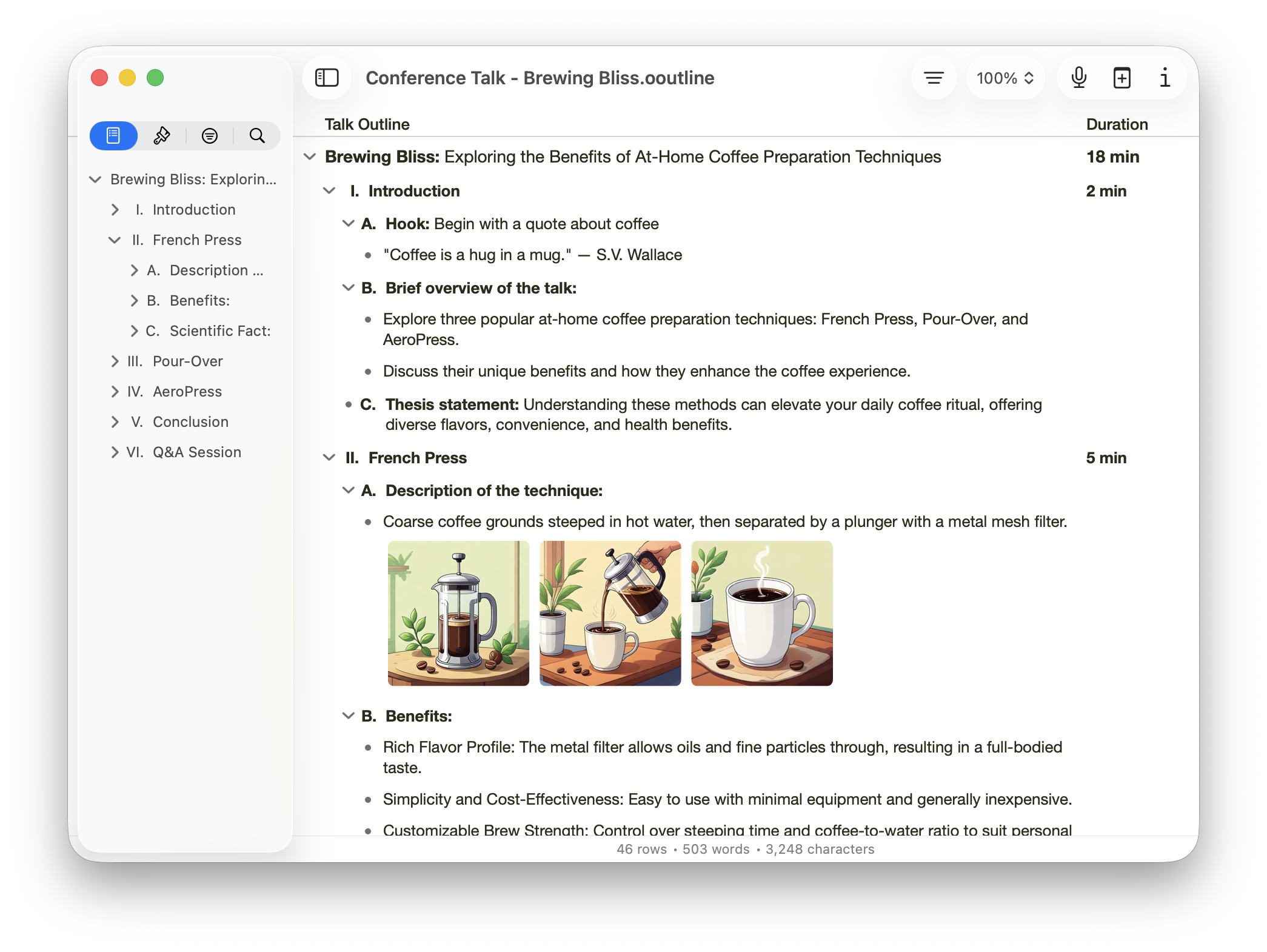
OmniOutliner 6 continues our Liquid Glass journey, offering a significantly modernized design as a universal app for all of Apple’s computing platforms: desktop, mobile, and spatial.
Other Exciting Advances
OmniOutliner 6 now supports more features which were previously exclusive to one platform across all our platforms, such as the ability to create and edit advanced Saved Filters. On Mac, OmniOutliner also gained the ability to open and work with concurrent multiple windows of the same document (particularly useful when working with long outlines).
We shipped OmniFocus 4.6 with enhanced note and attachment functionality, new support for image attachment resizing, paste behavior refinements across platforms, and more. We also shipped OmniFocus 4.7 which introduced a “Planned” dates setting to let you plan when you want to work on tasks and projects.
And of course, we updated all of our apps to be compatible with macOS Tahoe 26, iOS 26, iPadOS 26, and visionOS 26 on the day and date that those operating systems shipped. Plus the upcoming OmniGraffle 8 development and testing continued on the Mac first, with iPad, iPhone, and Apple Vision Pro to follow.
Looking Ahead
Which brings us to looking ahead to 2026. It bears repeating that plans are just plans. They are not promises; plans can (and probably will) change. So, with that caveat firmly in place, here are our plans for 2026:
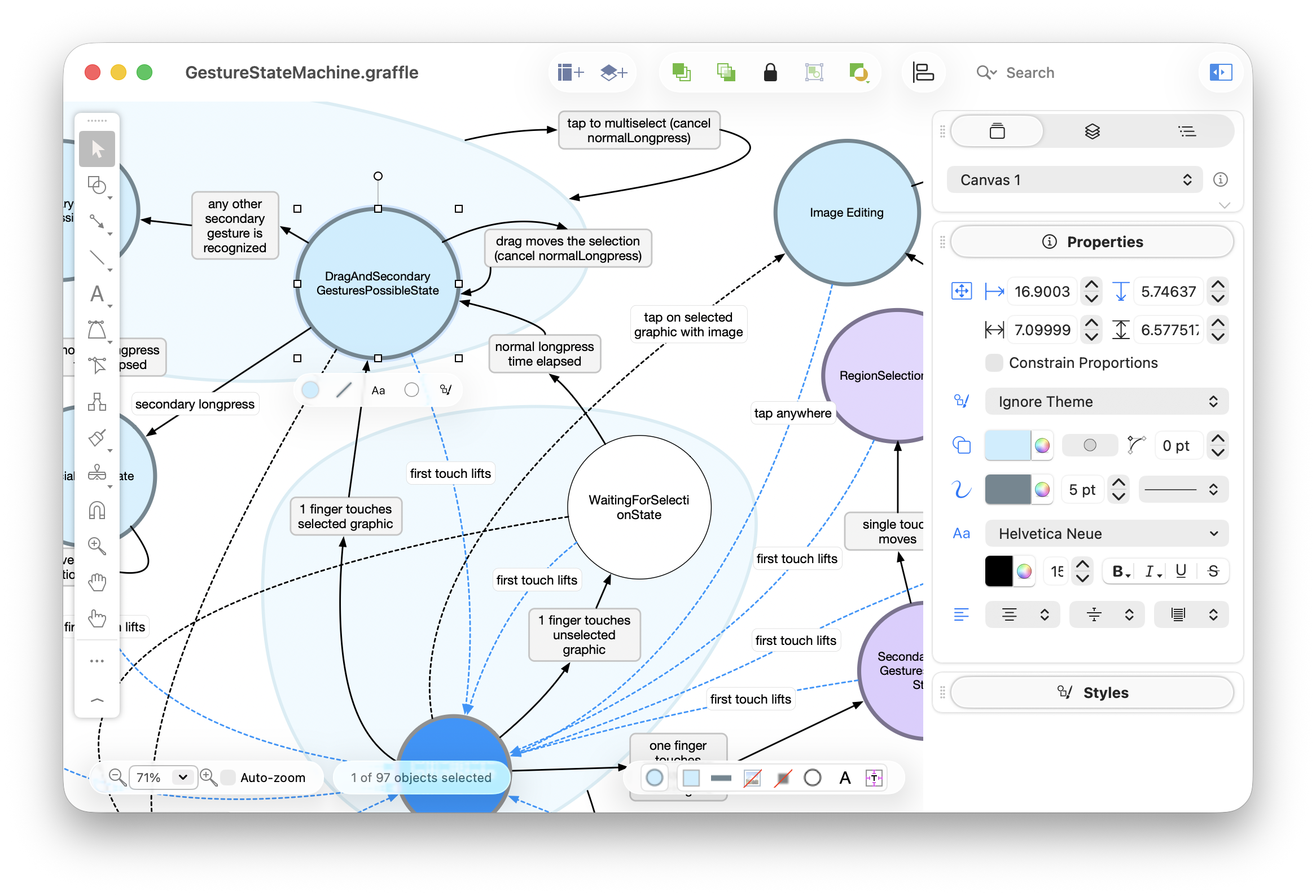
The biggest release we have planned for this year is OmniGraffle 8. This will be the culmination of many years of thoughtful work redesigning and rebuilding the app to be universal across all platforms. We’re using SwiftUI for a lot of this work, leveraging it to share more code and more logic: inspector palettes, settings, and so on.
Our work is focused on making OmniGraffle more approachable to new users, while not losing any of the powerful depth that our power users have come to expect—and, furthermore, to have a cross-platform experience that feels unified. We’re working to make it easier to navigate the app, so you can find its in-depth features when you need them, but not have them distract you otherwise.
Much like OmniOutliner 6, OmniGraffle 8 will also support: Liquid Glass design elements; Omni Links to link to (and share) content; Omni Automation access to the onboard Apple Intelligence LLMs, plus App Intents for when Siri starts to leverage them (hopefully this spring or so).
Though we’re designing OmniGraffle 8 to be a universal app, astute observers will note that our testing to date has been focused on the Mac platform. Mac remains Apple’s most capable platform, so we start with that focus to ensure we fully harness the Mac’s power. We then think about how to bring as much of that power as possible to Apple’s other platforms: iPad, iPhone, and Apple Vision Pro. Now that we’re on the home stretch, we will be starting TestFlights for those other platforms soon. OmniGraffle will be the final app in our suite of productivity tools to become universal, and we can’t wait!
Beyond OmniGraffle
Looking beyond OmniGraffle, we’re also very excited to bring Kanban to OmniFocus. We’ve spent significant cycles considering how Kanban works in the context of OmniFocus, and look forward to sharing that with you! We’re also working toward ultimately bringing Omni Links to OmniFocus, including Omni Links for attachments.
On the OmniOutliner front, of course we just shipped a major new release with OmniOutliner 6, and will continue its development with planned feature updates. We’re working on localizations for Dutch, French, German, Italian, Japanese, Korean, Portuguese, Russian, Simplified Chinese, and Spanish. We’re also working on enhanced App Intents, as well as Omni Links for attachments.
That may sound like plenty of development work for one year! All of those features that we’ve brought to the other apps will of course also be coming to OmniPlan: Omni Links, a Liquid Glass refresh, support for App Intents, and Omni Automation access to Apple’s Foundation Models framework (Apple Intelligence).
You can also expect that we’ll have compatible updates ready for new operating systems in the fall, as we do every year. It’s important to us, because we know people rely on Omni apps in their workflows (and new hardware always requires the latest operating system).
OmniFocus users outside of the United States may be interested to know that we’re looking to speed up syncing for customers on other continents, if possible. To this end, we’re testing new servers in Amsterdam and Singapore. OmniFocus data migrated to servers in other geographic locations would remain encrypted with keys only known to your devices, still included at no additional cost.
As mentioned above, we may need to shift our plans during the year, but we hope this gives you some sense of where we’ve been, what we’re working on today, and where we’re headed next!
(At the Omni Group, we make powerful productivity apps which help you accomplish more every day. Feedback? I’d love to hear from you! You can find me on Mastodon at @kcase@mastodon.social, or send me email at kc@omnigroup.com.)
