You may have noticed that Apple has made our summers quite busy in recent years, keeping us on our toes by introducing first visionOS, then Apple Intelligence, then Liquid Glass. Relatively speaking, this summer’s operating system updates were a breath of fresh air! We do love new technology and we’ve enjoyed working with each new thing—but this summer we were relieved to update our apps to reflect Apple’s refinements from the last few years, rather than adapting our products for yet another new major technology launch. (Naturally, that reprieve didn’t last long! We now only have a handful of weeks to get ready for the launch of the iPhone Duo announced last week.)
First things first: we’re pleased to report all of our apps are ready for all of Apple’s platform updates, compatible universally across the board. This is no small juggling act, with OmniGraffle supporting three platforms, OmniOutliner and OmniPlan supporting four platforms, and OmniFocus supporting five platforms—especially while we’re simultaneously pushing forward on new major features of our own for each product.
We know that many of you want to be productive on the new operating systems right away, so it’s a priority for you that our apps be ready as soon as possible—and thus it’s a priority for us. We have a good track record of being available “day and date,” but that’s not automatic and there are no guarantees: our track record comes from prioritizing that work. So this year, as always, it’s a relief to be able to say today, on day one, that “we’re ready.”
Of course, each summer we also try to go beyond that foundation of basic compatibility to take advantage of whatever new developments Apple is introducing. This summer, that meant adapting our apps for this year’s refinements to Liquid Glass, while exploring how our apps can best leverage new capabilities coming with Apple’s refinements to Apple Intelligence and Siri AI.
So, what’s ready, and what’s changed?
OmniFocus 4.9 adds support for Siri AI, optional new date parsing assistance via Apple Intelligence, and a range of new and updated App Intents exposed as Shortcuts actions. Alongside full compatibility with macOS 27 Golden Gate, iOS 27, iPadOS 27, watchOS 27, and visionOS 27, this release fine-tunes design elements throughout OmniFocus and introduces a new option for customizing the behavior of the Perspectives Bar on iPhone.
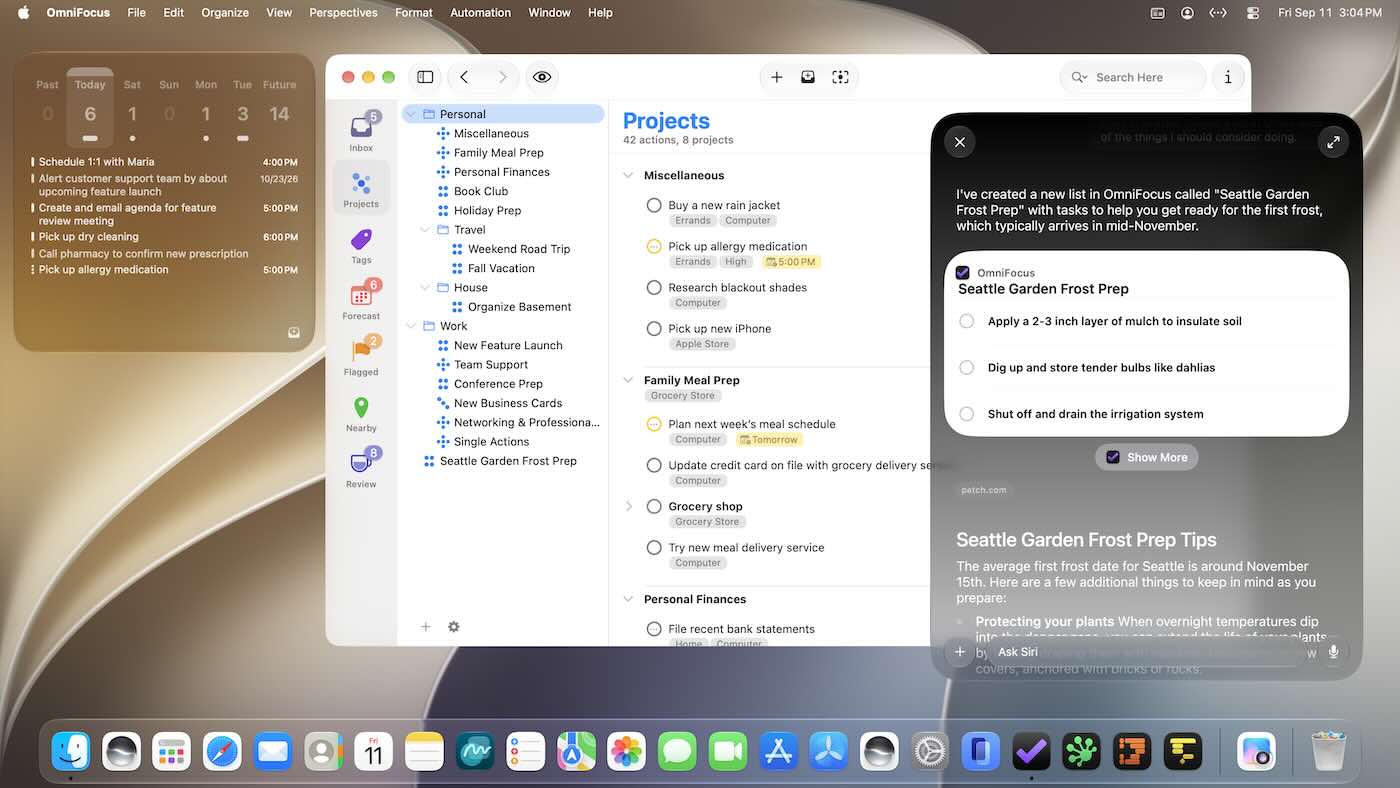
OmniOutliner 6.3 includes new Liquid Glass refinements across all Apple’s platforms, making the app feel more at home on the new operating systems.
Our other apps which are now compatible with ‘OS 27 include: OmniPlan 4.11 (for all platforms), OmniGraffle 7.26 for Mac and OmniGraffle 3.23 for iPad and iPhone, and OmniPresence 1.10. (Even the latest test builds of OmniDiskSweeper and OmniWeb have been updated.)
On the automation front, we’ve added new API to OmniFocus and OmniOutliner that humans and tools can use to search the Omni Automation API. (How meta!) This means that as we work towards implementing the Model Context Protocol (MCP), that interface can be much more efficient by giving tools the ability to write scripts while only pulling in the documentation needed for the task at hand.
While building these updates, we explored how our apps can leverage new capabilities with Apple’s refinements to Apple Intelligence and Siri AI, as well as finding out what Siri and Apple Intelligence can and cannot do at this time.
Built for the Future of Siri AI and Apple Intelligence
Apple has built a really great foundation for the future of Siri. Siri started out answering questions about things it could find on the Internet (stock prices, sports scores, and so on). It grew to control your device in simple ways (start a timer, etc.) that expanded over the years. Now, leveraging Apple Intelligence, Siri AI understands a lot more of what we say, and has access to the personal context we already have on our devices—putting that information to use, while still keeping it private and under your control.
Giving Siri access to personal context is a big advance. I’ve always been able to search my computer for a locally stored document, but with Siri I can now ask questions about the content stored in those documents. I trust my computer with that content—it already lives on my device, after all—so it’s incredibly powerful to be able to ask the computer to reference and do something with it.
Let’s say we just had a meeting, and a team member sent out the minutes. I can ask Siri to create reminders in OmniFocus for the follow up items from that meeting. All of this can be done while keeping my data private and secure, on devices that are under my control. The system doesn’t need to copy my data elsewhere; it just has new ways of working with this data it already has.
It’s a tremendous leap forward for those of us who like to control our own data. And it’s still early days for this technology: we see potential for more progress in the future.
That said, there are some important limits worth noting.
In our testing we’ve found that the new Siri AI hasn’t yet learned how to work with app capabilities that it hasn’t specifically been trained on, even for App Intents that are available in Shortcuts and Spotlight. For example, its understanding of how to work with OmniFocus is based on how it’s been trained to work with the Reminders app. Our work in OmniFocus 4.9 means that Siri now knows about “reminders” in OmniFocus (i.e. actions and Inbox items), “lists” (i.e. projects) which contain reminders, and any “groups” (i.e. folders) that lists have been organized into. Siri can assign and edit reminder due dates, flags, repeat schedules, and notes and image attachments in OmniFocus. This is another great leap forward! But as soon as you try to go beyond what Reminders can do, you find its limits: for example, it doesn’t understand the distinction between due dates, planned dates, and defer dates.
Siri also doesn’t really understand much about how our document-based apps work, because Apple hasn’t trained it on our specific apps or anything equivalent. So, Siri doesn’t know how to make an outline, or a diagram, or a Gantt chart. We expect this to improve over time—after all, we’ve worked with other language models that do understand how to make those things—but it’s important to understand Siri’s current limits.
Siri now knows what’s on the screen, which gives it a lot more context than it used to have. And Siri has some ability to manipulate things on the screen—sometimes. However, Siri doesn’t actually know how to fully control the screen. It doesn’t yet understand how to activate controls, or invoke commands from menus such as our plug-in actions. Fortunately, on macOS Voice Control can fill that particular gap, and a few years ago we did a lot of work to implement Voice Control: with one install, you can control every menu command in OmniFocus using your voice. Voice Control and Siri are designed to work together cooperatively. You can ask Siri to do something; then use Voice Control to open a window, switch perspectives, or run a plug-in; then go back to talking with Siri. (To learn more, check out OmniFocus Voice Control page put together by our automation expert, Sal Soghoian.)
Taking a step back, a fundamental limit to understand is that language models are not perfect oracles. Models generate statistically probable responses to prompts, not actual answers to questions. Models don’t know fact from fiction. You can ask Siri questions about what it can and can’t do and try to explore its limitations, and it will make up plausible responses to those prompts. But those answers are often just made up, or regurgitated from its training set without true understanding. The answers may sound authoritative, but that doesn’t mean they actually reflect reality.
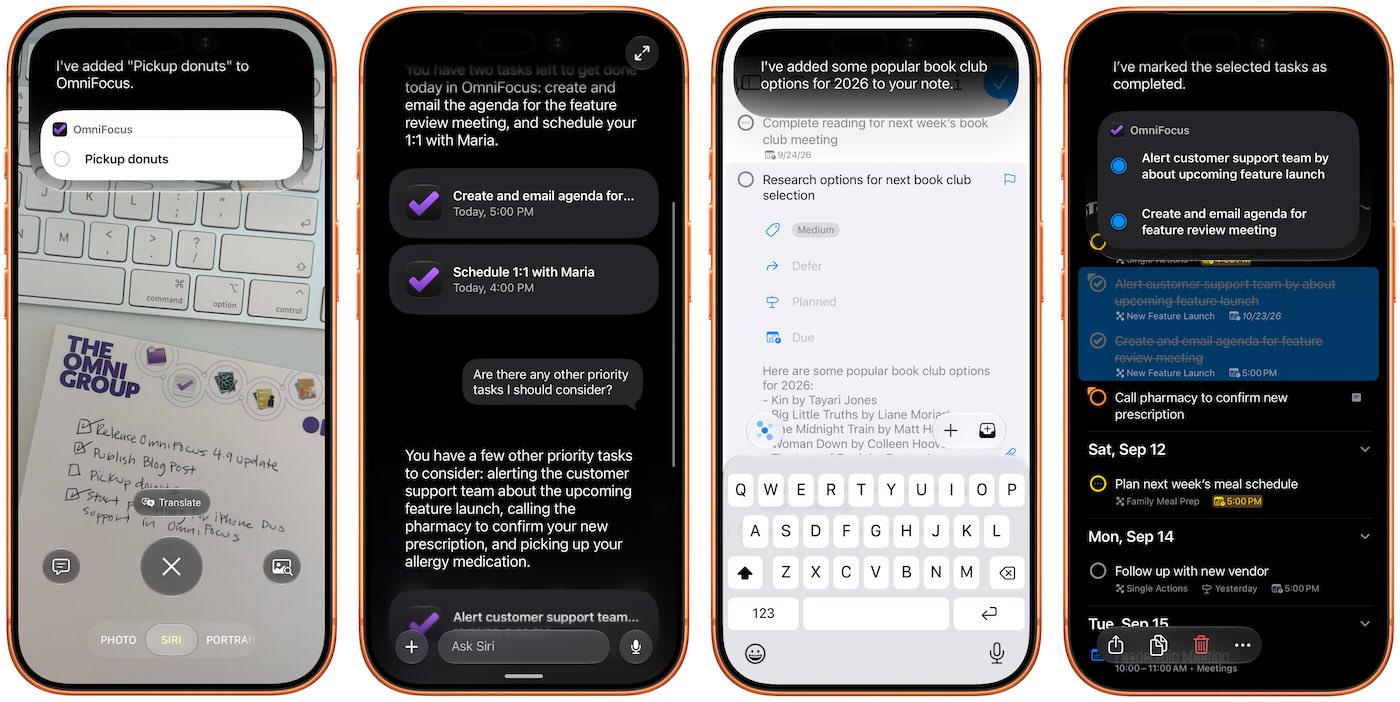
Overall, though, it’s exciting to see how much more capable Siri has become. And I haven’t even covered everything! Beyond Siri’s traditional capabilities, beyond personal context and improved language processing, Siri now also has Visual Intelligence to gather information from the world around you—combining Optical Character Recognition (OCR), handwriting recognition, shape recognition, and other visual AI technologies. For example, you can pick up a note with hand-written action items and ask Siri to add those items to OmniFocus. Or you can take a picture of a whiteboard and ask Siri to do things with that input.
Spotlight has been an important Mac technology for decades, and our apps have had strong support for Spotlight since it was first introduced in 2005. With Siri AI, Spotlight becomes even more important as a source for personal context. You can ask Siri about content in your OmniFocus database, so Siri can summarize the actions you’ve completed this week, or tell you what items you might consider working on soon.
There’s a lot here to celebrate! Apple’s advances are great. And, as noted above, we never take for granted that we’ll make our goal of having all our apps compatible on the day and date that the operating systems are released; so it’s a huge relief to have all of that work done. We celebrate that those updates are shipping!
Also, last week we celebrated the 34th anniversary of the Omni Group (the date we registered omnigroup.com)! Speaking of things we never take for granted, 34 years is quite a long time. Looking back at 1992, the Soviet Union had just dissolved at the end of the previous year. Meanwhile, from our neck of the woods in Seattle, Nirvana had taken over the music charts, and the novel Snow Crash had just popularized terms like “metaverse” and “avatar.” And, especially relevant to our tech world, NeXT was just shipping NeXTSTEP 3.0.
When we say this is our anniversary, “our” includes you: we couldn’t have made it this far without you. Thank you for supporting us through all these years! Of course, we’re looking forward to celebrating our 35th year next year as we continue this journey with you.

This is the original logo used by the Omni Group from 1992 until the Aqua redesign in 2001. (I created this on a NeXT using Pixar’s RenderMan with a hand-written text RIB source file, back when 3D renderings of marble carvings were still novel.)
(At the Omni Group, we make powerful productivity apps which help you accomplish more every day. Feedback? I’d love to hear from you! You can find me on Mastodon at @kcase@mastodon.social, or send me email at kc@omnigroup.com.)