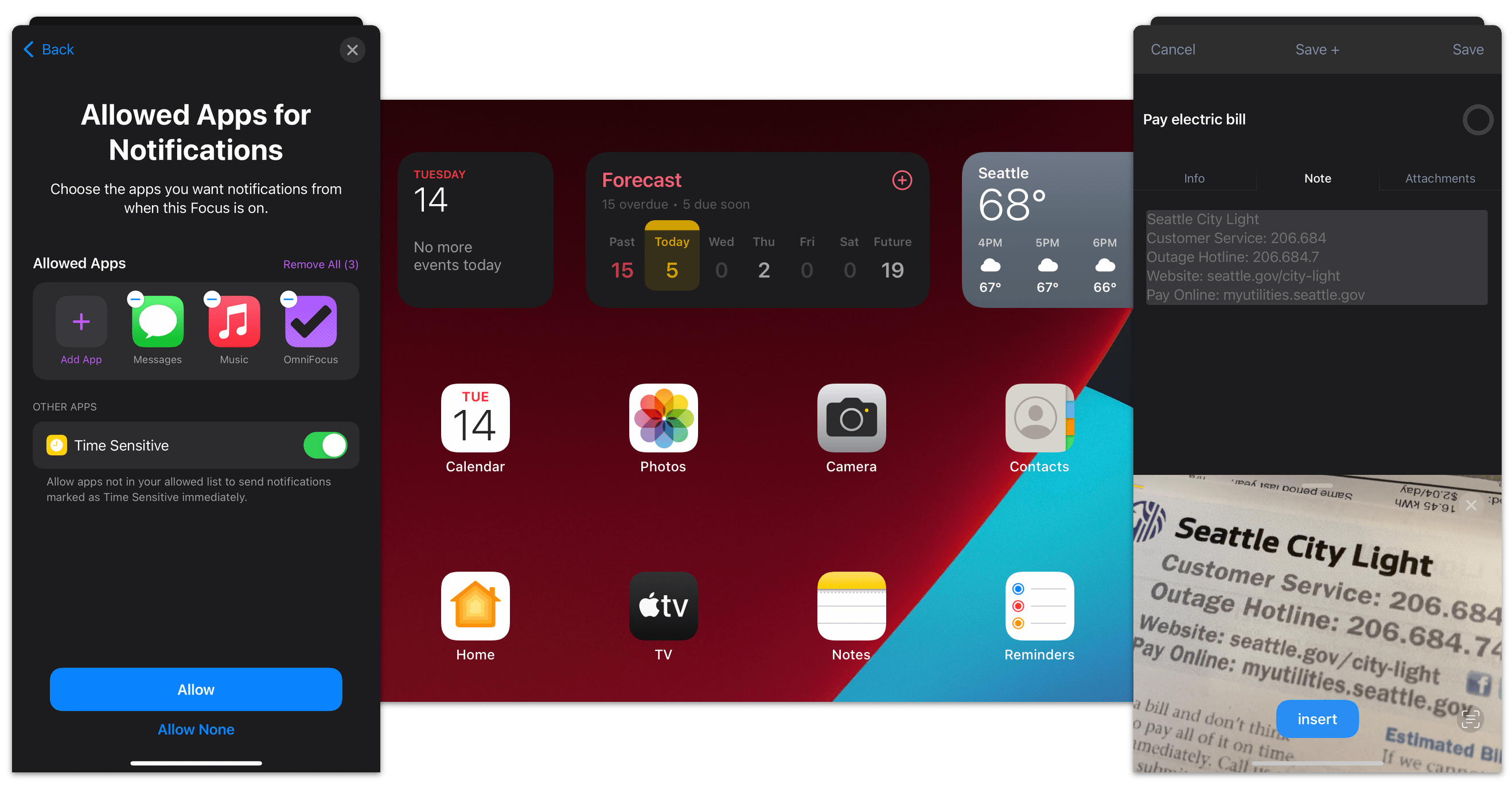
OmniFocus for iPad v1.3 updates Forecast Mode: Never spread yourself too thin. Enable Calendar integration to see your hard landscape events alongside your overdue and due soon OmniFocus actions. Use the View options menu to show your items with a start date. Reschedule your projects and actions—with just a tap or two—to keep your days balanced.
This update also includes full screen note viewing and editing, improved support for screen mirroring, and a number of other user interface and workflow improvements.
[NOTE: If you're reading this within a few hours of approval, your local App Store might not have the update yet. If that happens, just wait an hour or so and then try again: it will be there soon!]
We love hearing from you! You can reach us by tapping Contact Omni (in the Gear Menu above the sidebar), sending email to
omnifocus-ipad@omnigroup.com, tweeting to
@omnifocus, or calling 1-800-315-OMNI or +1 206-523-4152.
Forecast
-
Forecast mode now integrates calendar events into a convenient timeline. Use the View options menu to configure which calendars appear on the timeline, and the range of hours for which events are displayed. (This feature requires iOS 4.0 or later.)
-
Forecast mode now includes an additional section for viewing items starting on the days of the upcoming week. Use the View options menu to hide or show this section.
-
Tapping “View” on a Due Reminder alert now takes you to the Forecast screen, showing you all items which have become overdue at once.
Editing
-
The Note section of the Editor now includes an expand button. Tap on the expand button to view or edit your notes full screen.
-
When searching in the Project and Context pickers, Smart Match terms are underlined in the search results.
-
When assigning a Project or Context to an Action, search results are now presented in Library order rather than alphabetically.
Workflow
-
The application’s badge counts the union of overdue, due soon, and flagged items. Items that are both flagged and overdue or due soon are no longer counted twice.
-
Folders’ remaining count incorrectly included Single-Action Lists.
-
Dropped Contexts are only visible in the Context move popover when the current View options are set to All.
-
Dropped Folders are only visible in the Project move popover when the current View options are set to All.
-
Errors from automatic sync sessions no longer interrupt you with an alert. Instead, the Sync button is badged. Tapping the Sync button will display the error alert and offer to retry the sync.
User Interface
-
OmniFocus takes advantage of hardware screen mirroring when available.
-
When mirroring your iPad 2 on a secondary display, OmniFocus now shows your gestures—taps, pinches, swipes, and all—so that your viewers can follow along.
-
Untitled items are now correctly represented in Project, Action, and Context lists.
-
Fixed a bug that could cause incorrect sorting of a Perspective’s actions when grouped by a date.
Inbox
-
The Inbox badge count no longer includes completed items.
-
Items blocked by a future start date are once again excluded from the Inbox badge count.
-
Paste and New Action are now available from the contextual menu for the Inbox header.
-
Fixed a bug which prevented you from moving an item to the top of the Inbox.
Review
-
Projects within the Review sidebar are sorted in Library order.
-
Fixed a bug where launching OmniFocus into Review mode with the Inbox selected incorrectly resulted in an empty list of projects needing review.
-
When there are no remaining Projects requiring review, the plus button no longer gives multiple choices for creating an Inbox item.
Stability
-
Fixed a crash which could occur when entering the background and using Bonjour syncing.
-
Fixed a rare problem which could lead to a crash if OmniFocus received a memory warning while in landscape orientation.
-
Fixed a regression where Email Debug Info (to the OmniFocus support ninjas) was inappropriately using the in-app mail client.
I'm very pleased to announce that OmniOutliner for iPad is now available on the App Store for $19.99!
We've posted screenshots and a video tutorial on our OmniOutliner for iPad pages, and here's the official press release:
The Omni Group Brings OmniOutliner to the iPad
OmniOutliner for iPad Enables Users to Efficiently Create, Collect and Organize Information on the Popular Tablet
SEATTLE – May 12, 2011 – The Omni Group, a developer of productivity applications for Mac and iOS, today announced that OmniOutliner is now available on the iPad. The iPad edition of the company’s popular note-taking and outlining program offers users the ability to create, collect and organize information in a multitude of ways including creating to-do lists and agendas, managing tasks and expenses, taking notes and planning events. OmniOutliner for iPad is available for purchase on the App Store.
Industry analysts forecast that 52 million tablets are estimated to be shipped in 2011, with the iPad comprising 75 percent of these shipments. While iPad and other tablets have been traditionally used for consuming content on the web, watching videos, reading e-books and listening to music, selecting the right tools and apps can easily optimize the iPad for use as a mobile computing platform for business.
"The moment we learned about the iPad we knew it marked a shift in the direction of personal computing devices," said Ken Case, CEO and founder of the Omni Group. "Each time we bring a productivity app to the iPad we redesign it from the ground up to take advantage of this new platform, and OmniOutliner for iPad is no exception. Our team has done an amazing job of making the app easier to use than ever, without sacrificing the app's power. OmniOutliner is the app I turn to whenever I want to collect and structure my thoughts, and it's great to be able to take my outlines with me and work with them wherever I am."
OmniOutliner for iPad includes the powerful features specifically designed to help iPad users get the job done simply and easily:
Rich Text Styling– Fully customizable text styling options provide users with the same functionality as expected from a word processor with a simplified style system that’s already available in OmniOutliner 3.
Simple Outline Restructuring– OmniOutliner for iPad affords users the ability to easily rearrange and drag rows individually. Additionally, users can mark multiple rows to either group or move them at the same time.
Multiple Column Formats– In addition to text, OmniOutliner for iPad provides column options for numbers, duration, pop-up lists, and date types, many of which include their own specific data formatting options.
Inline Image Support– OmniOutliner for iPad allows users to paste images directly into their documents, which will be displayed inline.
Improved Document Sharing– With OmniOutliner for iPad, files can be emailed or uploaded to users’ MobileMe accounts or any other WebDAV servers. Files may also be transferred with iTunes, and can be sent in HTML, plain text, or OPML using the above methods.
Compatible with OmniOutliner 3– OmniOutliner for iPad is completely compatible and interchangeable with files generated in OmniOutliner 3.
Ability to Import OPML Files– OmniOutliner for iPad allows users to import OPML files, a common format used by basic outlining applications, directly into the application.
OmniOutliner for iPad is more than just an outlining tool, offering multiple columns, smart checkboxes, customizable popup lists, and an innovative styles system within a few easy clicks. The app’s document structure is effective for brainstorming new ideas, drilling out project specifics, and lining up the steps needed to get everything done.
OmniOutliner for iPad is available for $19.99 on the App Store at www.itunes.com. More information about OmniOutliner for iPad is available at www.omnigroup.com/omnioutliner-ipad/.
###
About the Omni Group
One of the first companies to develop software for the Mac OS X platform, the Omni Group is a leading developer for Apple products and has designed several productivity applications for Mac OS X, iPhone, and now iPad. Founded in 1993, the Omni Group is located in Seattle.
We hope you enjoy our latest app!
When I announced last week that OmniOutliner for iPad had been submitted to the App Store, I noted that we were still busy putting together our marketing materials which explain what the app does in more detail. Well, we just finalized our App Store description and screenshots, so I'd like to share those with you now:
OmniOutliner starts as a blank page. But as you collect, compose, and rearrange text, its powerful outlining features emerge to organize your ideas. Hierarchy, columns, styling, notes — use them all in concert or keep things simple, depending on the project at hand. From basic lists and tables to serious writing and data wrangling, OmniOutliner understands how to keep your work structured and tidy.
Why choose OmniOutliner for iPad?
COMFORT: OmniOutliner was designed with speed and ease in mind, especially for data entry. Carefully-planned keyboard interactions and the ever-present Edit bar make it straightforward to add and rearrange items. Your ideas are what’s important — OmniOutliner just helps you get them in order.
STRUCTURE: Expand and collapse groups to concentrate on what’s important now. Use the flyout Plus buttons to put new items right where you need them. And of course, just drag items around when you need to rearrange the order. If you need to make a bigger change, use Edit mode to move or modify a bunch of rows at once.
COLUMNS: Checkboxes, formatted numbers, pop-up lists, dates… Keep track of any number of different fields in each row. If you have too many columns to see at once, you can hide some. Or just temporarily slide them underneath the main outline column to get at the ones you’re interested in. You can even sort your rows by any column, then restore their original order.
STYLES: Thanks to the included sample documents and styles, you may never need to adjust anything yourself. But if you want to, check out our custom rich-text editor, with more detailed styling than you’re likely to find anywhere else on iPad. Save your favorites as named styles, for quick and consistent styling across your document. Even chain styles together to automatically change rows based on their position in the hierarchy.
NOTES: Inline notes make it easy to keep track of ideas for future revisions, ancillary content, reviewers’ comments, ill-considered notions, snide jokes, and other miscellaneous info. You can attach notes to any row in a document, and show or hide them individually or en masse. And of course, notes can be styled just as precisely as the main content.
LINKS & ATTACHMENTS: Web addresses you type automatically get linkified. And any image you can copy and paste, from tiny embellishments to sketches from a drawing app to full-sized photos, can be placed right in your outline.
SHARING: OmniOutliner has no shortage of ways to share your documents. Import and export via iDisk, WebDAV, or email, in several formats: OmniOutliner (compatible with OmniOutliner 3 for Mac), OPML (compatible with other outlining applications), HTML, or good old-fashioned plain text. You can even choose a dynamic HTML export with expandable and collapsible groups.
SUPPORT: If you have any feedback or questions, we'd love to hear from you! The Omni Group offers free tech support: you can reach us by email at omnioutliner@omnigroup.com, by phone at 1-800-315-6664 or +1-206-523-4152, or on twitter at @omnioutliner.
Thank you!
And now, the screenshots!


Sadly, the App Store only allows for five screenshots. Fortunately, our blog has no such limitation, so here are a few more!


Again, we don't know exactly how long it will take for OmniOutliner to be reviewed, but hopefully it won't take too much longer. Once it has been approved, we'll post a specific launch date and time—so if you haven't seen anything here yet, there's no need to keep checking the App Store. In fact, if you'd like to be notified by email the moment OmniOutliner is available on the App Store, you can subscribe to our low-traffic OmniNews mailing list or to our OmniOutliner Users mailing list. Or you can follow @omnigroup or @omnioutliner on twitter.
As always, I'd welcome any feedback you might have: leave a comment here, or send me a message on twitter (where you'll find me at @kcase). Thanks for taking the time to read this!
When the iPad was announced last year, I posted that we were planning to bring all five of our productivity apps to iPad. We've just submitted OmniOutliner for iPad to the App Store, the fourth of those five apps:
I've been looking forward to OmniOutliner for iPad all year: OmniOutliner is the app I turn to whenever I want to collect and structure my thoughts (it's where I'm writing this text right now!) and it's great to be able to take those outlines with me and work with them on my iPad.
Now that OmniOutliner for iPad has reached GM, we're busy putting together some screenshots and an intro video which explain how the app fits together, and we look forward to posting those to our main website as well as more information here. For now, though, let me share this teaser video:
We don't know exactly how long it will take for OmniOutliner to be reviewed, but hopefully not more than a week or two. If you'd like to be notified by email the moment OmniOutliner is available on the App Store, you can subscribe to our low-traffic OmniNews mailing list or to our OmniOutliner Users mailing list. And, of course, you can watch this space—or follow @omnigroup or @omnioutliner (or me, @kcase) on twitter.
Meanwhile, let me briefly give some updates on our other projects! But first, an important reminder: our plans do change over time, so please don't rely on things happening according to today's particular snapshot of those plans.
-
OmniPlan v2 just went into beta, adding multi-user collaboration over the air (through Apple's MobileMe or our own Omni Sync Server, or your own private WebDAV server). For more about that, see last week's blog post. Once we wrap up this beta, we'll finally be ready to start on the last of our “iPad or Bust!” projects, OmniPlan for iPad.
-
Our free Omni Sync Server has been in beta since last summer, and it's been working quite well: over 18,000 people have signed up and feedback has been overwhelmingly positive. This will remain a free service for all Omni customers when it leaves beta; if you haven't tried it already, I encourage you to give it a spin!
-
OmniGraphSketcher for Mac has a major update now in beta which adds support for log scales—important when you're trying to compare trends in data which might be orders of magnitude apart. We're also working on bringing that work over to the iPad app.
-
We're very close to submitting an update to OmniFocus for iPhone, adding the very popular Forecast view which was introduced in the iPad app. (Here's a screenshot.) Our test pilots found a few bugs around the edges that we need to squash before it's ready to ship, though, so it'll probably be another week or two before it's submitted (and another week after that before it's reviewed).
-
For OmniOutliner 4 for Mac we've taken apart our entire outline architecture, rebuilding it on top of more modern OS X infrastructure such as CoreAnimation and bindings. The rebuilt outline architecture from OmniOutliner 4 reached a major milestone last week with our public beta release of OmniPlan 2—and now that OmniOutliner for iPad has been submitted, we can focus more of our direct attention on OmniOutliner 4.
-
We're planning some major updates to OmniFocus for Mac, polishing up its user experience to match the ease of use and aesthetics of the iPad edition, adding the Forecast and Review modes which we introduced in the iPad app, and adding support for syncing projects with OmniPlan.
-
And finally, we're looking forward to updating our apps to take advantage of the new features Apple is introducing in Mac OS X Lion, such as the Versions autosave architecture, built-in Resume, and full-screen apps.
As always, I'd welcome any feedback you might have: leave a comment here or send me a message on twitter (where you'll find me at @kcase).
UPDATE: I just realized that I forgot to mention the price! OmniOutliner for iPad will be $19.99.

I'm very pleased to announce that all of our paid apps are now available through Apple's new Mac App Store! The Mac App Store is the most convenient way to buy our software, letting you purchase, download, and install our apps with just one step, and easily update our apps at the same time as you update other apps you've purchased from the the store.
But to be clear, the Mac App Store is not the only way to buy our software: we'll continue to offer direct sales and updates through our own website as well. Through our website, we can offer much more flexible terms and options: trial and beta downloads, upgrade pricing, and discounts for volume, bundle, and educational purchases.
No matter which way you buy our software, you'll be getting the same product: all of our Mac App Store apps are exactly the same as the apps we sell through our website (except for a few minor changes made to work with the store). We'll also keep future updates to our apps in sync—apps you've purchased directly through us will continue to update themselves as they always have, while App Store updates will appear on the App Store (after a slight delay due to the App Store's review process). And either way, you'll have the same great support from our team here at Omni.
—
A few quick questions that I know a few people are wondering about (because I've already been asked!):
"Why doesn't the App Store recognize that I've already purchased an Omni app?"
The Mac App Store only supports software which you've purchased directly from it. That's even true of Apple's software, as I found out this morning while testing Keynote. And unfortunately, there's no way for us to tell the Mac App Store that someone has already purchased one of our apps. (Though really, that wouldn't be fair to Apple since they wouldn't get their 30% of the purchase price to help support the store's infrastructure.)
There's been a bit of confusion over this point, since the App Store does notice when the exact same version of the exact same app is already installed: it displays "Installed" instead of a price tag. But that doesn't mean it will update that software: as soon as the version number changes (on either side), it reverts to showing you a price tag for that app instead.
"If I'm purchasing from the Australian Mac App Store, why are your prices so much higher than they are through your own website?"
On our website, we sell all our products in our local currency—and since we live in Seattle, that currency happens to be US dollars.
For the Mac App Store, we don't set prices directly; we choose a price tier which Apple uses to choose a price for each region. We've chosen the price tier which is closest to our own online store pricing (just a few cents different in our local currency), but exchange rates fluctuate and this week you might happen to get a better deal buying directly from us than you do when purchasing locally. Please feel free to take advantage of that if you wish!
"Where do I find your apps on the Mac App Store?"
We've added links on each of our product pages, or you can go straight to the Mac App Store's page for the Omni Group.
"Does your 30-day money-back guarantee apply to Mac App Store purchases?"
Absolutely! But please remember that the 30-day guarantee is not intended to take the place of a trial period: we pay 30% of our App Store sales to Apple whether or not we refund a purchase. If you'd like to try one of our Mac apps, we have two-week trial downloads available on each of our product pages. (If you need more time than two weeks, please contact sales@omnigroup.com for an extended trial license.)
—
As always, if you have a question I didn't answer (or any other feedback you'd like to share), please let me know! Either leave a comment here, or send me a message on twitter (where you'll find me at @kcase).
It's been another crazy busy month here at Omni! In the last four weeks, we've celebrated Thanksgiving and somehow survived Seattle's snow, we've started private beta testing of OmniPlan 2 and shipped updates to OmniFocus and OmniWeb for Mac. Oh, and that's not counting the 13 app releases we've submitted to the App Store this month: 2 iPhone updates, 4 iPad updates, and 7 "new" Mac apps (OmniFocus, OmniGraffle Standard and Pro, OmniOutliner Standard and Pro, OmniGraphSketcher, and OmniOutliner).
"OK," I hear some of you asking, "15 app releases this month? That's great and all, but really I only care about one release: where is OmniOutliner for iPad?"
Well, given that we're at the end of November and we have yet to reach beta, I think I can predict with confidence that OmniOutliner for iPad won't be shipping this year. We did finally come up with a design that makes us all reasonably happy on paper, but we're still busy implementing that design in code—after which we'll be running it through its paces to make sure it works as well on an actual device as it does in our imaginations.
(Not that our engineering team has been idle while all this design work has been going on. They've been busy working on all the nuts and bolts which make up the unique functionality offered in OmniOutliner!)
For those who prefer pictures, here's an updated graphic:

"You're really going to sell your apps through the Mac App Store?" I hear others asking. "What about all those questions and challenges you mentioned in your last blog post? How will you handle upgrade pricing and volume discounts, for example?"
We've decided the best way to solve those problems is to recognize that the Mac App Store isn't an exclusive distribution channel, so it doesn't need to solve every problem. We will continue to sell our apps through our own website (in addition to the App Store), where we can continue to offer discounts for upgrades, bundles, and volume purchases. We still think the Mac App Store will be the most convenient way to purchase apps for the average consumer, but those who prefer more flexible terms and options will be able to continue to purchase and install apps directly from us.
"Hey, wait, those weren't my questions at all!"
Hmm, um, OK, sorry, my magic 8-ball palantír must be broken! If you have a question I didn't answer (or any other feedback you'd like to share), please let me know! Either leave a comment here, or send me a message on twitter (where you'll find me at @kcase).
I think the Mac App Store is going to be a huge boon for Mac consumer software, and we're looking forward to publishing the same suite of Omni Group apps on the Mac App Store that we've been busy bringing to the iPad App Store: OmniFocus, OmniGraffle, OmniGraphSketcher, OmniOutliner, and OmniPlan.
The Mac App Store will be a much, much better app buying experience than any option consumers currently have: you'll be able to experiment with buying software from developers you don't know without worrying about whether they will be careful with your billing information, or whether they might even be shipping you malware. You won't have to figure out how to install the software or any of its future updates. (The standard mechanisms for distributing Mac software electronically have a poor user experience, whether they're distributed as disk images, zip files, or Installer packages.) The standards Apple will be enforcing for apps listed in the store will set a baseline for overall quality and make it less likely that apps will interfere with each other. And, of course, a central Mac App Store makes it far easier for you to find all sorts of current, supported software in the first place.
The App Store is also great from the independent developer's point of view: we don't have to figure out how to build our own online stores (or find someone else to distribute our software), or how to distribute license keys or scale up our websites and bandwidth to handle lots of downloads if we suddenly get written up by a popular reviewer. Those of us who are already established in the Mac market have already built up a lot of this infrastructure, of course, so this benefit may not be as important to us as it is to new developers. But we'll benefit from a strong, healthy, growing market for Mac apps.
And while it's new to the Mac, we know the App Store works well for consumers: we've sold tens of thousands of copies of our iOS apps in just the last few months.
Not that there aren't plenty of questions and challenges. The App Store doesn't currently have any mechanism for offering discounted pricing to certain customers, so what do we do for our OmniGraffle 5 customers who want to upgrade to OmniGraffle 6 on the App Store? Or for people who want to upgrade from Standard to Pro? (Do we even list Standard and Pro as separate apps on the store, or do we try to combine them?) How do we handle sales to organizations which want a discount for purchasing 100 licenses? How do we take care of customers who have an older system which can't run the latest version of our app, but could run an older version if we could get it to them? How do we handle trial software? Should the product pages on our website point at our own online store or the App Store—or both?
And on top of all these questions, of course, is one I've seen a lot of other developers asking: is all this worth giving Apple 30% of our revenue?
Managed hosting and payment processing are worth something, certainly, but I think the real benefit is that our software is far more likely to reach consumers who otherwise simply wouldn't see it. To date we've tried to reach consumers by placing our software in retail channels, where the split is much worse: you're lucky if you clear 50%. Not to mention that retail is completely impractical for software under $20, since there's so much overhead involved with printing boxes and CDs, warehousing them, shipping them, updating them when you ship new versions, etc. Finally, even once you've resigned yourself to the cost of getting there and you've finally made it onto retail store shelves, it turns out that the retail experience isn't great for finding software anyway—its only benefit is that it's somewhere the average consumer knows to look. (Or at least it's somewhere they used to look; but with cheap software cut out of the picture, limited shelf space, and so on, I'm guessing fewer and fewer people bother!)
But the App Store changes all that: it offers a much more efficient distribution channel, where everyone on the platform will know to look. You can easily browse around, or search for something specific. When you find something you want, you simply click "Buy Now" and the app starts downloading and adds itself on your Dock. No more futzing about with figuring out how to buy something from yet another vendor's website, tracking license keys, and so on. You just find what you want, buy it, and start using it.
That's the experience we'd like all our customers to have, and that's why we're looking forward to publishing our apps in the Mac App Store.
10/24 UPDATE: From the comments, it seems some people are assuming that we're planning to stop selling software directly, i.e. to only offer our software through the Mac App Store. Sorry if that wasn't clear: we do intend to keep selling software from our own site as well, where we're able to offer trial downloads as well as discounts for upgrades, bundles, and volume purchases. We view the Mac App Store as a great alternative to retail stores (which have all those same limitations), not as a replacement for our own site (which doesn't). (Also, to be clear, we plan to charge the same list price both on our store and in the Mac App Store, just as we charge the same list price on our store and in retail.)
What a whirlwind of a year it's been! When the iPad was announced in January, I posted that we were planning to bring all five of our productivity apps to iPad. We've now shipped three of those five apps:

We're very proud of how well the iPad apps we've shipped so far are being received; they all have ratings which average four stars or better. And we're about to ship updates to each (with OmniFocus 1.1, OmniGraffle 1.3, and OmniGraphSketcher 1.3) which we'll be talking more about soon.
But we still have two more apps to ship!
First, a quick update on OmniPlan: we haven't really started on OmniPlan for iPad yet, because we're still busy building OmniPlan 2 for Mac. That's about to enter private beta; hopefully that process will give us a better sense of how close it is (and thus how soon we can start on the iPad app).
OmniOutliner is definitely closer, and we've made a lot of progress, but we've still got a ways to go.
When I say OmniOutliner has made a lot of progress, what I mean is this: it's currently able to read and view and edit and save OmniOutliner documents. But if there's one thing we've learned from building OmniFocus for iPad, it's that creating a great touch-based interface for text outlines is not an easy problem! It takes a lot of time. (Particularly when we have high standards for the animations: suddenly we have to worry about what the screen looks like through dozens of frames of animation, not just what it looks like before and after a change.) Creating a touchable outline wasn't easy to solve for OmniFocus, but at least there we knew what basic attributes each task would have: so we could decide which pieces of information to hide at what times, how to size and present everything to put your attention on the right pieces of information, etc. With OmniOutliner, on the other hand, every document gets to define its own schema, with different sets of columns, different summaries, etc., and we don't know what it all means and which bits of information are most important—so we have to build an interface which is much more general and flexible. It's fun work, but hard work and we still have a lot of it to do!
Meanwhile, Apple just gave developers a beta copy of iOS 4.2, which will be a free operating system update for the iPad and iPhone operating system when it ships in November. Since we still have a lot to do anyway, we think it makes the most sense to build OmniOutliner for iOS 4.2 (where we can take advantage of a number of its new features) rather than continuing to build OmniOutliner for iOS 3.2 and later scrambling to try to catch up with iOS 4.2's features. Since OmniOutliner for iPad will require iOS 4.2, it won't be out until sometime after that ships. (Though hopefully not long after!)
So, those are our plans at the moment! As I said in my original iPad or Bust! introduction, our plans change over time, so please don't rely on things happening exactly according to today's snapshot of those plans. But hopefully they will at least give you some insight into what we're doing and why, making it possible for you to decide whether we're going in a direction you're interested in.
As always, I'd welcome any feedback you might have: leave a comment here or send me a message on twitter (where you'll find me at @kcase).
Today we're releasing OmniFocus 1.8, a free update for anyone using OmniFocus for Mac. OmniFocus 1.8 includes numerous updates to improve the user interface, workflow, and reliability.
The 1.8 update will now clean up automatically when switching views, moving items to their proper locations, just like OmniFocus for iPhone and OmniFocus for iPad. Filtering is improved with the more flexible View Bar. All items, including groups, projects, and Inbox items, can appear in Context-mode lists, making them easier to find. Also, groups and projects can now become next actions, so there is no need to switch to Planning mode to finish up a project.
Perspectives can now be easily shared as files, by simply dragging them out of OmniFocus. As introduced in OmniFocus for iPhone, a new bookmarklet can send web pages to the Inbox from a web browser.
Synchronization is faster and even more stable. Additionally, due item alerts can be synchronized alongside the OmniFocus database as a calendar.
For more information, including complete release notes, please visit the OmniFocus download page. If you're already using OmniFocus, you can Check for Updates from the OmniFocus menu to automatically download and install this latest update.
We hope you enjoy OmniFocus 1.8!
[Last update: 7/29]
Hello, everyone! Remember back in iPad or Bust when I said that our natural inclination is to be open about what we're doing, but that there were several problems with talking about future plans?
Well, I'm running smack into one of those problems right now: we were hoping that we'd be ready to submit OmniFocus for iPad to Apple on June 30, and we shared that date last week. It's wonderful that everyone is so excited about that date, but I need to remind everyone that June 30 was never intended as a promise—it was simply our best estimate at that moment.
The team has been working around the clock on this for quite a while, and we made a very big push over the weekend. We're in that part of the development cycle where it's hard to predict exactly how soon we'll be done. The app feels very close—but tomorrow is closer.
Just in case you're still wondering "So when will OmniFocus for iPad be ready?"—I'm afraid I don't have anything else to suggest beyond what I just said: we're working around the clock, and at this stage it's hard to predict exactly how soon it will be done. We're still testing the app and we don't know what issues we'll uncover or how long those issues will take to fix. So, again: it feels close, but tomorrow is closer.
Sorry, I know this will be disappointing news for many of you—it's certainly disappointing for us. But we think the time put into the final product will be worth it: thank you for your patience. If you have any questions or concerns, please feel free to contact me directly at kc@omnigroup.com.
7/12 UPDATE: Sorry, I know the wait has been hard for everyone. (It's been hard for me, too!) This weekend I invited several people to help us beta test OmniFocus, and their feedback has been overwhelmingly positive. I have to keep reminding myself that Le mieux est l'ennemi du bien, "the perfect is the enemy of the good," and that "not shipping" might be a worse flaw than a missing feature that we'd really like to implement. (After all, there's always 1.1!) To that end… I've been sorting through a few hundred bits of feedback to decide which issues and suggestions are important to address for 1.0 and which ones can wait. I'm about half-way through the list, and will post another update soon.
7/16 UPDATE: We've reached a big milestone: we've declared feature and UI freeze. The documentation is written, we have an intro video and welcome document, and so on. But we're not quite done yet: we're still tuning performance and memory usage, fixing glitchy animations, and eliminating crashes. Our test pilots are busy finding problems so you won't have to.
7/20 UPDATE: Code freeze! Release candidate tagged and built, it just needs to be put through a (hopefully final) round of testing.
7/21 UPDATE: Submitted to the App Store! (I know they're very busy, but according to Apple's latest stats they review 85% of new apps within 7 days.)
7/28 UPDATE: The clock is definitely ticking, but there are still about 12 hours for OmniFocus to remain part of the 85%. If you'd like to be notified by email the moment OmniFocus is available on the App Store, subscribe to our low-traffic OmniNews mailing list.
7/29 UPDATE: Expecting App Store approval at any moment. If we receive it between now and 6am tomorrow (Pacific Time), that's when we plan to release.
Page 2 of 4 pages < 1 2 3 4 >