Omni Newsletter Fall 2026
After a really busy summer, we’re ready to harvest the fruits of our labors – which means you get to enjoy the fruits of our labors!! We also have plans for the rest of the year. Check it out.
Hey Siri, We’re Ready!
Our first priority every summer is updating our applications for compatibility with whatever Apple throws our way at WWDC. After a few exceptionally jam-packed summers—first visionOS, then Apple Intelligence, then Liquid Glass—this summer’s operating system updates were a breath of fresh air! Rather than adapting our products for new major technology launches, this summer reflected an effort to update our apps for some important refinements.
We’re pleased to report all of our apps shipped ready for all of Apple’s platform updates (macOS 27 Golden Gate, iOS 27, iPadOS 27, visionOS 27, and watchOS 27), compatible universally across the board. Of course, we also try to go beyond that foundation of basic compatibility, which this summer meant adapting our apps for this year’s refinements to Liquid Glass, while exploring how our apps can best leverage the new capabilities from Apple’s refinements to Apple Intelligence and Siri AI.
We’re particularly proud of our September OmniFocus update, OmniFocus 4.9, in which we introduced full support for Siri AI reminder functionality. Our work in OmniFocus 4.9 means that Siri now knows about “reminders” in OmniFocus (i.e. actions and Inbox items), “lists” (i.e. projects) which contain reminders, and any “groups” (i.e. folders) that lists have been organized into. Now that Siri can create and take action on reminders in OmniFocus, you can do things like:
- Ask Siri to break a goal down into actionable steps.
- Move a hand-written to-do list into OmniFocus with Visual Intelligence.
- Ask Siri about remaining and recently completed items in your OmniFocus database, since those are now indexed by Spotlight.
- Ask Siri to take action on the items you’re viewing (apply a flag, or mark as complete), or draft an email summarizing the upcoming work displayed in a perspective.
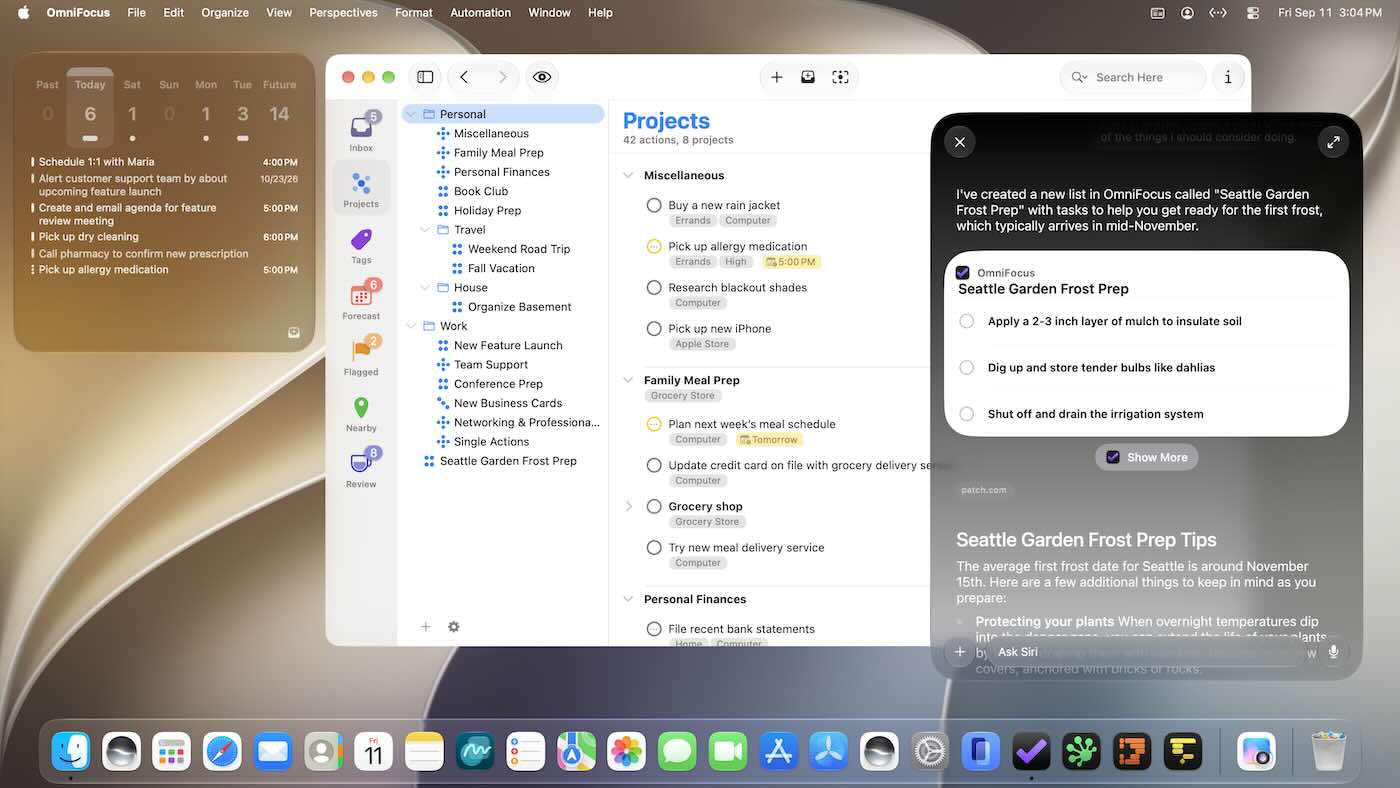
Additional technical details, as well as some of our thoughts on where Siri AI is headed, are outlined in the “Hey Siri, We’re Ready!” blog post!
Designed for iPhone Duo
The iPhone Duo announcement provided little time to design for this intriguing new device. Truth be told we love a good challenge, such as the various ways one can interact with it. And while it’s true that we have a long and rich history of being ready on Day One for a new platform (even without touching it first), the handful of weeks to design for it properly was really quite something.
Because of its folding nature, the iPhone Duo is like six devices in one—there’s the tent layout, the book layout, the laptop layout, plus the new Split Screen modes, the iPad mini layout, and ultimately it’s really been an engaging design journey in that regard. It lent itself to some interesting, dynamic adaptations for sidebars and inspectors.
If you’re lucky enough to have an iPhone Duo on its way, OmniFocus and OmniOutliner are ready for you, along with the OmniGraffle 8 TestFlight. Since they were designed specifically for the iPhone Duo, they efficiently display content and controls on the compact outer display, adapt to the unique layout of the spacious interior display, and are ready to multitask alongside another app in Split View.
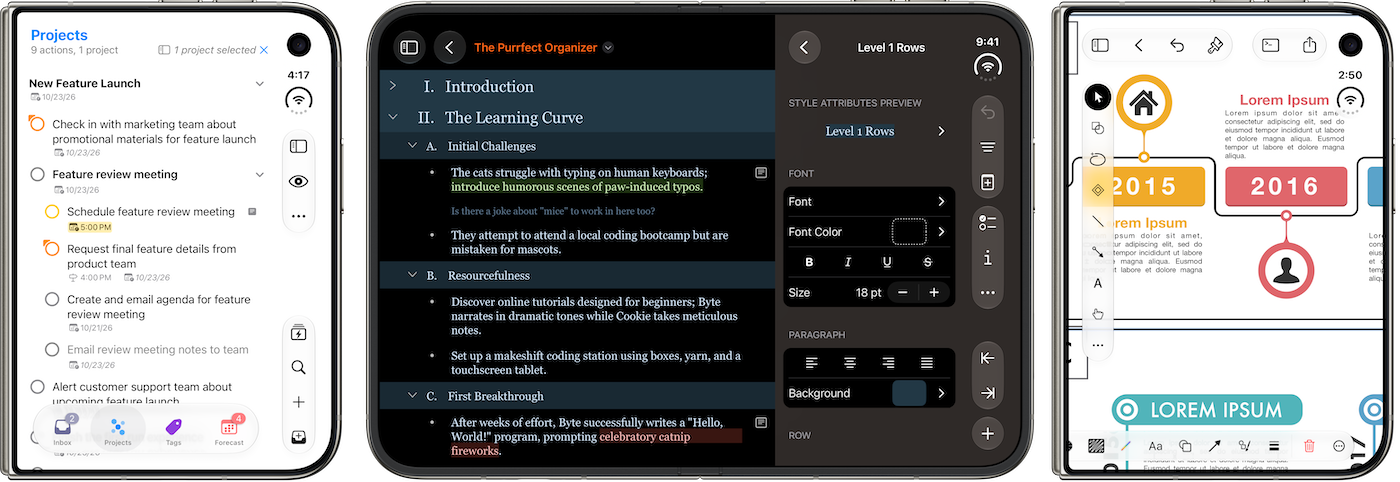
It would have been difficult to do all this without our investment in SwiftUI, which continues to pay dividends.
From the Omni Labs: Refining OmniGraffle 8
Development of OmniGraffle 8 for Mac, iPad, iPhone, and Apple Vision Pro continues apace, with test builds for almost all platforms now available (look for OmniGraffle 8 for visionOS in TestFlight soon!).
In recent OmniGraffle 8 test builds, we’ve built out Canvas Styles, which replaced and improved upon the functionality previously provided by themes. Customization of objects using Canvas Styles can be managed in the new Style Overrides Palette, which also handles Symbol style customization. We also substantially improved the Layers Palette on iPad and iPhone, and introduced initial iPhone Duo support.
We sincerely appreciate everyone who has run OmniGraffle 8 test builds and provided feedback! If you’d like to help out—or get a sneak peek—head on over to our test page, and check out the release notes, then send your feedback to omnigraffle@omnigroup.com (OmniGraffle 8 for iPad and iPhone test builds require iPadOS or iOS 27, OmniGraffle 8 for Mac test builds require macOS 15 Sequoia). Specific information about any performance or stability issues you encounter while working in these test builds is particularly helpful to our team!
Automation and Intelligence
On the automation front, while working on this summer’s compatibility updates, we added new API to OmniFocus and OmniOutliner that humans and tools can use to search the Omni Automation API. (How meta!) This means that as we work towards implementing the Model Context Protocol (MCP), that interface can be much more efficient by giving tools the ability to write scripts while only pulling in the documentation needed for the task at hand.
We continue to explore how our apps can leverage new capabilities with Apple’s refinements to Apple Intelligence and Siri AI, as well as finding out what Siri and Apple Intelligence can and cannot do at this time.
Members of our community are also demonstrating new and interesting ways to build off of this integration—like Tim Stringer, who recently released the "Describe OmniFocus Action" shortcut action, which harnesses the power of the Apple Intelligence cloud model, for members of his “Learn OmniFocus” program.
Highlights from The Omni Show
We’re always interested to hear and showcase the unique ways people approach productivity and our software. Here are some highlights from the amazing community surrounding the Omni Group’s award-winning products, as heard on The Omni Show:
How Maggie Delano Uses OmniFocus — An Associate Professor and Chair of Engineering at Swarthmore College, Maggie Delano’s work spans teaching, department leadership, medical device design, inclusive engineering, research, plus everyday life. A wonderful teacher, Maggie walked us through how OmniFocus helped move from scattered tasks and responsibilities to a durable system, while offering thoughtful advice that extends beyond any app to examine whether the root challenge is technical, psychological or external.
How Nick Disabato Uses OmniGraffle — Fascinating in his explanations, designer, writer, and Draft consultancy founder Nick Disabato provides living proof that even experienced designers get routinely surprised by A/B test results pointing to the need for evidence and experimentation to turn design into “making the numbers go up,” and citing decades of using OmniGraffle and OmniOutliner to help move quickly from messy problems to clear, testable ideas.
How Nathan Snelgrove Uses OmniFocus — A candid, compelling storyteller, Nathan Snelgrove shares about starting his career as a writer, designer and web developer by day and guitar player by night, leading to his choice of task management tools dating back to OmniFocus 2 and how he learned that writing down every step lets him work at basically the speed of thought, plus he makes a persuasive case for bringing your whole self to your work and staying involved in your own thinking, whether you lean on a task manager or not.
Omni on Ice
While Omni has fully transitioned to remote work, with most folks logging in from the comfort of their home office, we do retain a physical office here in Seattle. Recently, we relocated our collection of antique computer hardware and Think Different posters (plus a few workstations and modern Mac servers) to a new office space in North Seattle, near the Seattle Kraken’s ice hockey training complex. In the spirit of skating to where the puck is going to be, this summer our local team members met up for a morning of ice skating and curling!

Everyone had a great time, but don’t expect us to turn our keyboards and trackpads in for ice skates and curling brooms anytime soon!
Until Next Time
Thank you very much for reading this latest issue of the Omni Newsletter. Until next time, stay in touch with us on Mastodon, and of course on our blog.
Want to catch up on past newsletters? Check out the archive here.