
Introducing

OmniOutliner 6

Includes a free 14-day trial

Introducing

OmniOutliner 6

Includes a free 14-day trial

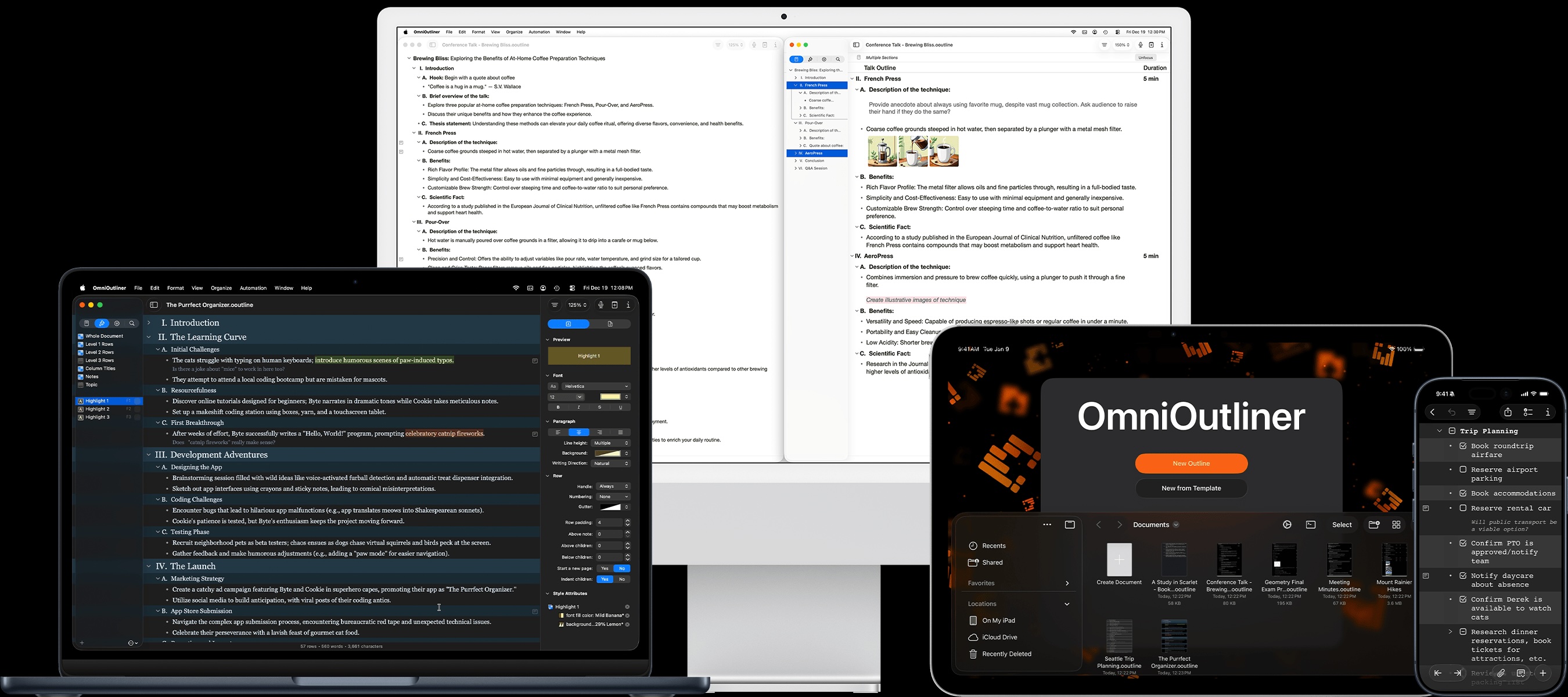
Purchase or subscribe to OmniOutliner 6 once for full access to OmniOutliner on your Mac, iPad, iPhone, and Apple Vision Pro.

Your thoughts, in order.

OmniOutliner is a powerful tool for organizing (and reorganizing) information, so you can see the full picture and structure your information effortlessly.

Meet OmniOutliner

Great things begin with outlines.

Whether you’re a writer or a student, an attorney or a software developer, outlines created in OmniOutliner can help clarify and develop ideas and concepts.

  • Screenplays and books flow better in OmniOutliner. Speeches, dissertations, and essays make all the points you want to make.

  • Class notes and meeting agendas created in OmniOutliner have structure that makes them easier to understand.

  • Unique OmniOutliner features, like helpful attachments and smart columns, assist in visualizing and planning projects and budgets.

Outline

Great things begin with outlines.

Whether you’re a writer or a student, an attorney or a software developer, outlines created in OmniOutliner can help clarify and develop ideas and concepts.

Screenplays and books flow better in OmniOutliner. Speeches, dissertations, and essays make all the points you want to make.
Class notes and meeting agendas created in OmniOutliner have structure that makes them easier to understand.
Unique OmniOutliner features, like helpful attachments and smart columns, assist in visualizing and planning projects and budgets.

"I've been using OmniOutliner for 20 years, and it's truly the best (and most trusted) system I've found to stop trying to use my brain as a filing cabinet."

Phil Alden Robinson
Director and Screenwriter

OmniOutliner Essentials

Get started with distraction-free outlining.

OmniOutliner Essentials offers a streamlined, focused interface that helps get you straight to the task of outlining by offering a selection of the most useful styling and organizational options.

  • Add structure to your information with support for unlimited levels of outline hierarchy. Expand and collapse sections to see the full picture or focus on the smallest of details.

  • Row status checkboxes turn any outline into a checklist.

  • Drag and drop to order, re-order, and nest the rows in your outline. Each outline row can also be accompanied by a note (if you’d like): an extra space for as little or as much information you need.

  • Quickly style your outline with beautiful built-in themes that automatically update when Dark Mode is turned on or off.

OmniOutliner Essentials

Get started with distraction-free outlining.

OmniOutliner Essentials offers a streamlined, focused interface that helps get you straight to the task of outlining by offering a selection of the most useful styling and organizational options.

Add structure to your information with support for unlimited levels of outline hierarchy. Expand and collapse sections to see the full picture or focus on the smallest of details.
Row status checkboxes turn any outline into a checklist.
Drag and drop to order, re-order, and nest the rows in your outline. Each outline row can also be accompanied by a note (if you’d like): an extra space for as little or as much information you need.
Quickly style your outline with beautiful built-in themes that automatically update when Dark Mode is turned on or off.

"I lead 100+ people across 4 timezones and rely on OmniOutliner for project plans, one on ones, brainstorming, meeting notes, you name it. […] I can’t imagine life without it."

Mike Burke
Software Development Director

OmniOutliner Pro

Take your outlines to the next level.

OmniOutliner Pro adds a full suite of styling, customization, and automation tools to create outlines perfectly suited for your exact workflow.

  • Focus on specific sections of your outline or apply a saved filter in the document sidebar.

  • Create documents with multiple columns that contain different types of information - like pop-up lists, checkboxes, numerical values, dates, durations, or just text.

  • Fully customize the appearance of your outline by configuring structural and named styles, enabling row numbering, and more.

  • Supercharge your workflow with powerful cross-platform Omni Automation Plug-Ins, which integrate Apple Intelligence on supported devices.

OmniOutliner Pro

Take your outlines to the next level.

OmniOutliner Pro adds a full suite of styling, customization, and automation tools to create outlines perfectly suited for your exact workflow.

Focus on specific sections of your outline or apply a saved filter in the document sidebar.
Create documents with multiple columns that contain different types of information - like pop-up lists, checkboxes, numerical values, dates, durations, or just text.
Fully customize the appearance of your outline by configuring structural and named styles, enabling row numbering, and more.
Supercharge your workflow with powerful cross-platform Omni Automation Plug-Ins, which integrate Apple Intelligence on supported devices.

A smarter way to write, a more productive way to stay organized. Whatever your project, OmniOutliner has the tools you need to get the job done.

Major Update

Introducing OmniOutliner 6.

Available now for Mac, iPad, iPhone, and Apple Vision Pro. With new universal licensing and improved feature parity across platforms, your outlines are always available on the device you have at hand.

  • Visually refreshed with beautiful Liquid Glass design elements and a modernized look and feel, OmniOutliner 6 feels right at home on the latest operating systems.

  • Dynamic Themes automatically update when Dark Mode is turned on or off. Override the automatic color conversion when desired, to create your own light or dark appearance.

  • With Omni Links, create links to documents, or specific content within a document, which can be shared with other users. Omni Links work on any device running OmniOutliner 6.

Major Update

Introucing OmniOutliner 6.

Available now for Mac, iPad, iPhone, and Apple Vision Pro. With new universal licensing and improved feature parity across platforms, your outlines are always available on the device you have at hand.

Visually refreshed with beautiful Liquid Glass design elements and a modernized look and feel, OmniOutliner 6 feels right at home on the latest operating systems.
Dynamic Themes automatically update when Dark Mode is turned on or off. Override the automatic color conversion when desired, to create your own light or dark appearance.
With Omni Links, create links to documents, or specific content within a document, which can be shared with other users. Omni Links work on any device running OmniOutliner 6.
