Update: I've added some comments about the -[CALayer shadowPath] approach that I missed before.
I've just pushed a new sample to the OmniGroup? source on github which shows several drop shadow approaches, with an eye towards performance, particularly while the shadow casting object's frame is being animated. One of these is a pair of functions vended by OmniUI, OUIViewAddShadowEdges?() and OUIViewLayoutShadowEdges?(), which originate from writing our document picker. In this case we want to be able to smoothly animate between two apparent view sizes as you open and close documents.
Opening up OmniGroup/Frameworks/OmniUI/iPad/Examples/DropShadowOptions? and building, you'll see a set of options that control the testing:
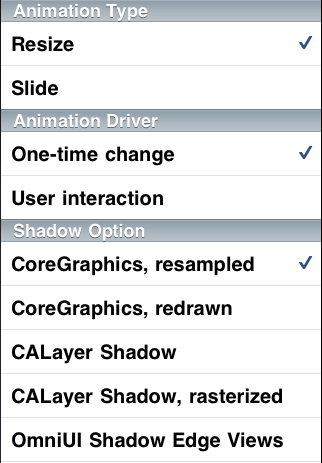
Animation Type
-
Resize: The size of the object changes, possibly leading to it being redrawn.
-
Slide: The object simply move, which may allow optimized screen rendering by compositing a previously cached backing store.
Animation Driver
-
One-time change: Some one-time programatic change is being made to the object that has a starting and ending state. These are driven by UIView animation.
-
User interaction: This simulates multiple successive small changes, as if the user were performing a sequence of dragging touches (like resizing a shape). These are driven by a timer, simulating events from the user.
Shadow Options
-
CoreGraphics, resampled: This renders the shadow into the view's content area with normal CoreGraphics calls. When the view's size changes, the content is not redrawn, but the previously created backing store is just scaled. If the change you are making is temporary (like a small zoom in/out bounce animation), this could be imperceptible to the user. One problem with the CoreGraphics-based approaches is that some of your content area is taken up by the shadow and positioning elements within your view needs to take this into account.
-
CoreGraphics, redrawn: The shadow is drawn into the backing store, as above. But, each time the view's bounds changes, a new backing store is generated. Note however, that UIView animations only generate a backing store image for the starting and ending frame and interpolate between them. There is not a new image generated for each frame of animation. This yields good performance for one-time, animations.
-
CALayer Shadow: CALayer provides shadowing options with the shadows being cast outside your content. This makes performing other geometry calculations simpler (like positioning sublayers) since you can turn on the shadow and forget about it.
-
CALayer Shadow, rasterized: Normally, CALayer shadows are built at the time that the layer is composited to screen. That means, each time you even move a layer, the full shadow needs to be recomputed. But, CALayer provides an option to request rasterization, which is enabled in this case.
-
CALayer, shadow path:(not shown in screenshot above since this was added to the test later) This uses the
shadowPathproperty on CALayer, which improves the performance of shadow rendering by allowing the layer to assume that the interior of the path is opaque (rather than having to convolve the alpha channel of the layer's contents). Sadly,UIViewseems to disable implicit animations for this property, and you need to be careful to share or reuseCGPathRefs. With this extra bookkeeping, it is a bit of a pain to use, but nice and speedy. -
OmniUI Shadow Edge Views: Given a UIView, these OmniUI functions add four thin views along the edges of your view. Each has a three-part stretchable image that renders the shadow. This takes advantage of the CALayer contentsCenter property to avoid even needing to re-fill the shadow edge contents on a resize. Like the CALayer approach, these views lie outside the view itself, simplifying the positioning of the content within the view (or other geometry calculations, in our case, calculating the animation parameters when opening or closing documents).
Performance
Running this app under Instruments with the Core Animation tool, we can check out the relative advantages of each approach. Instruments doesn't give a precise frame rate over time, but really we don't care. In the real world, you'd have other work to do during a live-resize of an object, so anything here less than 60fps (for just the shadowing) is likely too slow.
|
Resize/Once |
Slide/Once |
Resize/User |
Slide/User |
|
|
CoreGraphics, resampled |
Fast |
Fast |
Fast |
Fast |
|
CoreGraphics, redrawn |
Fast |
Fast |
Slowish |
Fast |
|
CALayer Shadow |
Slow |
Slow |
Slow |
Slow |
|
CALayer Shadow, rasterized |
Slow |
Fast |
Slow |
Fast |
|
CALayer, shadow path |
Fast |
Fast |
Fast |
Fast |
|
OmniUI Shadow Edge Views |
Fast |
Fast |
Fast |
Fast |
I'll call out the one "Slowish" result; this timed at ~45fps on my iPad. CoreGraphics shadowing is amazingly fast — nice work. Still, depending on the rest of your workload during the resize, "pretty fast" may not be good enough.
Conclusions
The default behavior of UIView/CALayer is great for simple situations. If, however, a user is dynamically interacting with an object that casts shadows and you want that object to not get blurry as it resizes, CoreGraphics may not be as fast as you'd like (obviously the rasterization or relayout of the inner content matters too).
Don't turn on CALayer shadows unless either enable rasterization on and aren't going to be changing the view's size, or are willing to do the extra bookkeeping to maintain a shadowPath. Generic CALayer shadows are stunningly slow if all you need is a rectangle, but the shadowPath hint makes them very zippy.
Finally, what does the OmniUI shadow edges approach tell us? This particular hack may not be useful in your app, but the core idea is that you shouldn't do work you don't need to do. When resizing axially aligned, opaque objects, we don't need a fully general shadowing algorithm.
We can deceive the user into thinking a real shadowed object is floating in their view, but we don't have to implement it that way. On a "magical" device like an iPad, you need to act like a magician: as long as it looks like something visually complicated is really happening, then your job as illusionist is complete.
